To cut the long story short, the M5 in is app 3x faster when exporting photos to local disk from Lightroom and creating previews and app 2x faster in AI masking. The rest is rather similar.
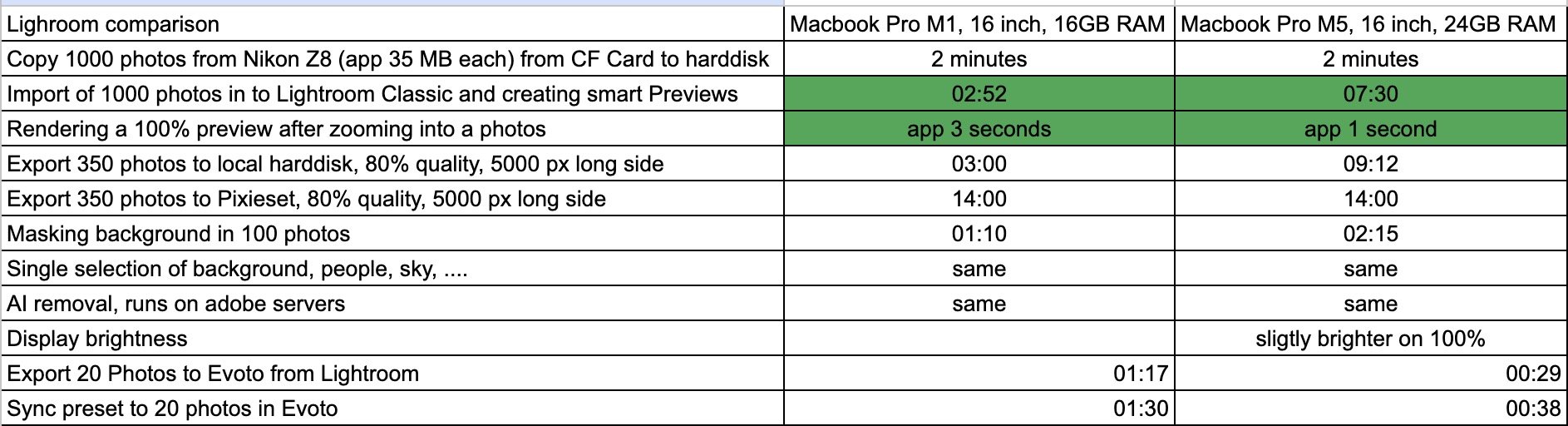
This review is not about Apple's marketing promises or benchmark tests. It is about the everyday routine of a full-time photographer using Lightroom. I always buy the low-spec 16-inch MacBook, as the spec upgrades do not correspond to extra value for my work. The following items in the table represent my usual everyday tasks. Normally, I divide the tasks into “do sth. else” and “sit on my ass and wait” tasks.
For “do sth. else” tasks, like exporting 600 images to Pixieset or creating smart previews for 1000 photos, I do not mind if it takes longer, as I am doing sth. else anyway. So the fact that the M5 MacBook renders the previews 5 minutes faster is not so crucial to me.
On the other hand, “sit on my ass and wait” tasks are really a bummer. The biggest waste of time I have in Lightroom these days is waiting approx. 15–30 seconds when I use AI removal. Here, unfortunately, the M5 does not make any difference, as the heavy lifting is done on Adobe's servers. Sometimes I want to zoom in to 100% to check if I am perfectly in focus, and here the M5 helps a lot. For me, this is probably the only practical reason I would need to upgrade.
There are some other bottlenecks that do not allow the M5 to fully shine. The copying speed of the photos to my hard disk is limited by the readout speed of my CF card. Uploading to my Pixieset gallery is limited by the upload speed.
Possible reasons for upgrading:
3x faster rendering of previews. If you like to check your photos in 100% preview, this is a valid reason. I check my photos at 100% very rarely.
2x faster automatic masking. For single photos, I haven't noticed any significant difference, but when syncing 100 photos, the M5 was faster.
Evoto retouching. I usually retouch 10–20 photos. But if you are doing, e.g., kindergarten photography or have big companies with several hundred headshots, this might be a good argument to upgrade.
Display brightness. I always adjust my display brightness 3–6 notches down, so for me, there is no added value here.
In general, the M5 feels slightly more responsive than the M1.
For the moment, I am waiting for further innovation and hope Adobe will implement more AI features that will rely on local computing power.